
By Jeremy
Published September 26, 2026

A virtual terminal is a secure web page, provided by your payment provider, where you type in a customer’s card details to charge them without a card machine. Businesses use one to take card payments over the phone, from mail order forms, and against invoices: a staff member logs in from a browser, keys in the card number, expiration date, security code and billing address, and the provider sends the sale for approval.
Because nobody dips, taps or swipes the card, a keyed sale is handled as card-not-present. That one fact shapes what the sale costs, who carries the fraud risk, and which PCI security rules apply. This guide covers all three, plus a phone routine for staff.
How a virtual terminal works
The PCI Security Standards Council, which maintains the card industry’s data security standard, describes a virtual payment terminal as a browser-based way to submit card transactions to a PCI DSS compliant service provider’s website, with the card data typed in by hand. As its SAQ C-VT questionnaire puts it, unlike physical terminals, virtual payment terminals “do not read data directly from a payment card.”
Here is what happens when you press submit:
- The virtual terminal sends the card details and amount to your processor for authorization.
- The request goes over the card network to the bank that issued the card, which approves or declines it.
- The answer appears on your screen, with the address and security code check results.
- Approved sales settle with the rest of your batch and are funded to your bank account.
A virtual terminal is not your website checkout, where customers enter their own card details. That is the job of an online payment gateway, covered on our e-commerce payment gateways page. And when the customer is standing in front of you, a reader that takes chip and tap payments is usually the better tool, for cost reasons covered below.
Who uses a virtual terminal
Any business that needs to charge a card it can’t dip or tap can use one. The common cases:
- Phone orders. A customer calls to order, book, or pay a balance, and staff key the payment while they are on the line.
- Mail orders. Staff enter the sale from a paper order form the customer sent in.
- Business customers paying invoices. Someone in accounts payable reads a company card over the phone. Suppliers who see a lot of this should look at the Level 2 and Level 3 data fields some virtual terminals support, and at our B2B and wholesale payments page.
- Service businesses. Contractors, repair shops, clinics, and professional firms taking deposits or balances by phone, including offices that rarely take cards and don’t want hardware.
How to take a card payment over the phone, step by step
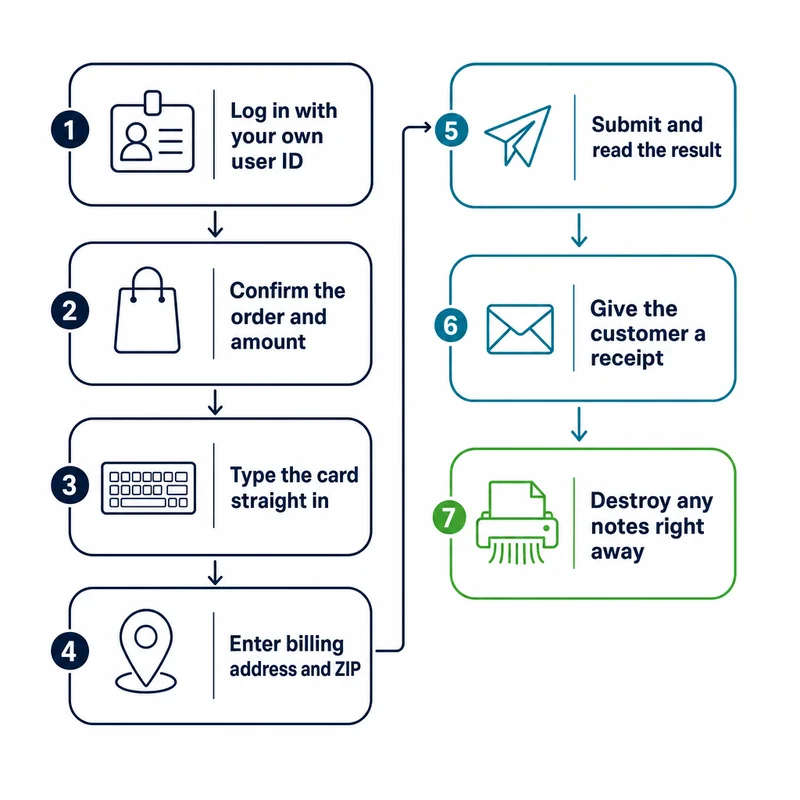
With a virtual terminal, the card number passes through your employee’s ears and fingers, so the routine matters as much as the software. Here is one to hand to staff:
- Log in with your own user ID. PCI DSS calls for a unique ID for every user and allows shared logins only as a documented exception.
- Confirm the order and the amount before asking for card details.
- Type the card number, expiration date, and security code straight into the virtual terminal as the customer reads them. No notepad.
- Enter the billing address and ZIP code exactly as the customer gives them. Never make one up to push a sale through. Visa’s rules, effective July 25, 2026, require address data sent for verification to be genuine cardholder data obtained directly from the cardholder.
- Submit and read the result: approved or declined, plus the address and security code match results.
- If the card is declined, ask for another card instead of resubmitting it. Visa’s rules limit resubmission after a decline, and for some reasons, such as a lost or stolen card or a closed account, a merchant must never resubmit that card.
- Give the customer a receipt using your provider’s method, by email or text if your virtual terminal supports it.
- Destroy any notes right away. Never keep the security code after authorization. If you keep a paper order form, store it locked up and destroy it under your written policy once it is no longer needed.
PCI rules for virtual terminals: SAQ C-VT
The PCI Security Standards Council says every business that stores, processes, or transmits card data should protect it under PCI DSS (our PCI compliance overview covers the basics). Merchants not required to file a full Report on Compliance validate with a self-assessment questionnaire, or SAQ. SAQ C-VT is the one written for virtual terminal users; its current version dates from October 2024, under PCI DSS v4.0.1.
According to the questionnaire, SAQ C-VT fits a payment channel where all of these are true:
- Card payments are keyed one at a time into a virtual terminal in a web browser.
- A PCI DSS compliant third-party service provider provides and hosts the virtual terminal.
- The computer used for it is in one location and isolated from other systems, for example by a firewall or network segmentation.
- That computer has no software that stores card data and no card reader attached.
- You don’t otherwise receive, send, or store card data electronically, and any card data you keep is on paper.
Two limits trip businesses up. SAQ C-VT doesn’t apply to e-commerce, so payments customers make on your website fall under a different questionnaire. And card numbers that arrive by email, text, or online form were received electronically, which the conditions rule out. The Council’s SAQ instructions add that connecting the virtual terminal computer to a cash register system would not meet the criteria.
The instructions also encourage merchants to confirm eligibility with the organization they report to, such as their acquirer (the merchant bank).
What staff may and may not keep
For phone payments, the practical questions are what gets written down, saved, or recorded:
| Card data | What the PCI documents say | Simplest habit |
|---|---|---|
| Security code (the three- or four-digit code on the card) | May not be stored after authorization, even encrypted. If it gets written down, the SAQ expects the paper shredded right after the sale or the code blacked out before storage. | Don’t write it down at all. |
| Card number on paper | Must be physically secured, for example in a locked drawer or safe, and destroyed when no longer needed by cross-cut shredding, incineration, or pulping. | Key it straight in and keep no paper copy. |
| Call recordings | The Council’s FAQ on audio recordings says a security code kept in a recording after authorization violates PCI DSS; every effort must be made to keep it off the recording, with suppression or redaction where available. | Pause or suppress recording while card details are read out. |
| Card number on screen | Displays are masked so only people with a business need see more than the first digits (the BIN) and the last four. | Work from the masked view. |
| Card numbers sent by email or text | Receiving card data electronically falls outside the SAQ C-VT conditions. | Ask the customer to call instead, or send a payment link. |
The questionnaire also covers anti-malware, security patches, a written security policy, staff awareness training, a list of your service providers, and an incident response plan.
Why keyed payments cost more: card-not-present pricing
Visa’s rules define a card-present sale as one where the card and cardholder are at the merchant and the sale is completed on a device that can read the card, or with a manual imprint. A virtual terminal reads nothing, so a keyed sale generally falls under Visa’s card-absent definition, even with the customer at your counter. Our guide to card-present vs. card-not-present transactions covers the difference.
Card-absent sales use different interchange categories. Visa describes interchange as a transfer fee between financial institutions; merchants pay a merchant discount to their own provider rather than paying it directly. Visa’s US interchange schedule effective April 18, 2026 lists these debit rates. Exempt cards come from certain small issuers that the Federal Reserve’s Regulation II exempts from its debit fee limits; regulated cards come from issuers subject to them. Those limits are still in effect but under legal challenge: a federal court in North Dakota ruled against them in August 2025 and put its ruling on hold while the Federal Reserve appeals, and the Fed has separately proposed lowering them.
| Visa debit category | Exempt debit rate | Regulated debit rate |
|---|---|---|
| CPS/Retail, Debit (card present) | 0.80% + $0.15 | 0.05% + $0.21* |
| CPS/Card Not Present, Debit | 1.65% + $0.15 | 0.05% + $0.21* |
*Plus $0.01 for issuers that certify to Visa that they meet its interim fraud-prevention standards.
Regulated debit carries the same interchange either way. For exempt debit, the card-not-present rate is roughly double.
For example, say a customer calls to pay a $200 invoice with an exempt Visa debit card. If they paid in person with a chip or tap, the April 2026 card-present rate would put interchange at 0.80% of $200 plus $0.15, or $1.75. Keyed into a virtual terminal as a card-not-present sale, it would be 1.65% of $200 plus $0.15, or $3.45. That $1.70 gap is interchange alone, before your provider’s own fees, and it is an example calculation, not a quote.
The practical point: when the customer is in front of you, dipping or tapping the card usually costs less than keying it. How much of the gap reaches your statement depends on how your pricing is structured.
Fraud checks, and who carries the risk
A virtual terminal gives you two checks on a keyed sale. Read both results every time.
- Address verification (AVS). Visa describes it as a service through which a merchant verifies a cardholder’s billing address. It checks the billing address only, not where you are shipping.
- Security code check. PCI DSS describes the code as the three- or four-digit number printed on the front or back of a card, used to verify card-not-present transactions.
Neither check makes a sale dispute-proof. Under Visa’s dispute rules, the cardholder’s bank can dispute a card-absent sale the cardholder says they didn’t authorize (condition 10.4), and a matching address or security code alone doesn’t make that dispute invalid.
The results still count. Visa’s April 2026 rules list delivery to the same address that returned an AVS match as compelling evidence your acquirer can submit against such a dispute. They also treat a 10.4 dispute as invalid when you sent the security code and the card’s bank couldn’t verify it, or approved the sale despite a mismatch. So collect the code and run both checks on every phone order.
Orders that deserve a second look before you ship or deliver:
- The address or security code check comes back as a mismatch.
- The caller wants delivery to an address other than the billing address, which AVS never checks.
- The caller tries several cards after a decline.
Keep order notes, delivery confirmations, and signed work orders. If a keyed sale is disputed, they are your evidence.
Features to look for, and when another tool fits better
Virtual terminals differ more than the name suggests. Features worth checking:
- Individual logins and permissions, so every employee has an ID and only managers issue refunds.
- A customer vault or tokenization, which stores a card with the provider for repeat charges so you don’t keep the number yourself. Visa’s rules require the cardholder’s express informed consent before a card is stored for future charges, so ask how the tool records it.
- Recurring billing for customers who agree to scheduled charges.
- Level 2 and Level 3 data fields if you invoice businesses that pay with commercial cards.
- Address and security code settings that decline or flag mismatches automatically.
- Receipts, voids, refunds, and exportable reports for your bookkeeping.
Virtual terminal, payment link, or card reader?
| Tool | Who enters the card | Best fit | Keep in mind |
|---|---|---|---|
| Virtual terminal | Your staff, from what the customer provides | Phone and mail orders | Card-not-present pricing; staff handle card data |
| Payment link or emailed invoice | The customer, on the provider’s hosted page | Customers who would rather pay on their own time | Staff never see the card; payment can lag |
| Card reader or smart terminal | Nobody; the card is read by chip or tap | Customers who are in front of you | Often lower interchange; needs hardware |
One more note on payment links: because the customer types their own card details on the provider’s page, the number never passes through your staff, which can change which PCI questionnaire applies to that channel. For customers in front of you, our mobile payments page covers taking chip and tap payments away from the counter.
Questions to ask your provider about a virtual terminal
- Is there a monthly or gateway fee for the virtual terminal, and what does each keyed sale cost?
- How will keyed sales appear on my statement, and can I see the interchange category for each?
- Can every employee have a separate login, and can I limit who issues refunds?
- Does it run address and security code checks on every sale, and can it decline mismatches?
- Can it send receipts by email or text?
- Which PCI self-assessment questionnaire do you expect me to complete?
If you already take keyed payments, your current statement shows how they are priced. PayPoint Systems, an independent merchant services provider based in Northwest Indiana, reviews statements like these as part of its free statement review.
Frequently Asked Questions
What is a virtual terminal for payments?
A virtual terminal is a web-based payment page from your payment provider that lets you charge a card by typing in its details, with no card machine. Staff log in through a browser, enter the card number, expiration date, security code and billing address, and submit the sale for approval. Businesses use it for phone orders, mail orders and invoices. Because no device reads the card, the sale is generally handled as card-not-present.
Can you give me an example of a virtual terminal?
Say a customer calls a plumbing company to pay a $450 repair bill. The office manager logs in to the virtual terminal in a web browser, types in the card details as the customer reads them, runs the address and security code checks, and emails a receipt before hanging up. No card reader is involved and nothing is written down. That is a typical virtual terminal sale.
How do I open a virtual terminal?
A virtual terminal usually comes with a merchant account or a payment gateway account, so opening one starts with applying for card processing and saying you plan to take keyed phone or mail orders. After approval, the provider gives you a login. Before the first sale, set up a separate login for each employee, turn on the address and security code checks, and find out which PCI self-assessment questionnaire applies to you.
How to accept a credit card payment over the phone?
Log in to your virtual terminal with your own user ID and confirm the order and amount. Type the card number, expiration date, security code and billing address directly into the screen as the customer reads them, then submit. Check the address and security code results, and give a receipt by your provider’s method. Avoid writing card details down: PCI DSS bars keeping the security code after authorization, and paper with card numbers must be kept secure and destroyed when no longer needed.
Is it legal to take card payments over the phone?
Card network rules provide for phone and mail orders: Visa’s rules define them as card-absent purchases, and the PCI Security Standards Council publishes SAQ C-VT for merchants who key eligible orders into a virtual terminal. Businesses taking phone payments still follow PCI DSS, their processor agreement, and any other rules that apply to them, such as rules on recording calls. For card data, that means no security codes kept after authorization or in call recordings.
How much does a virtual terminal cost?
The cost comes in three parts: any monthly or gateway fee for the virtual terminal itself, your provider’s per-transaction fees, and interchange set by the card networks. Keyed sales fall into card-not-present interchange categories, which Visa’s April 2026 schedule prices higher than card-present ones for many cards. To compare offers, total all three and divide by your keyed sales volume to get an effective rate.
Related guides
- The Cheapest Way for a Small Business to Accept Credit Cards
- Effective Rate vs Headline Rate: What You Are Actually Paying
Sources
- PCI DSS v4.0.1 Self-Assessment Questionnaire C-VT and Attestation of Compliance (October 2024), PCI Security Standards Council
- PCI DSS Self-Assessment Questionnaire Instructions and Guidelines, v4.0.1 Revision 1 (April 2025), PCI Security Standards Council
- FAQ 1210: Are audio/voice recordings permitted to contain sensitive authentication data? (June 2025), PCI Security Standards Council
- Visa Core Rules and Visa Product and Service Rules (18 April 2026), Visa
- Visa USA Interchange Reimbursement Fees (18 April 2026), Visa
- Regulation II (Debit Card Interchange Fees and Routing), Board of Governors of the Federal Reserve System
- Debit Card Interchange Fees and Routing, proposed rule, 88 FR 78100 (November 14, 2023), Federal Register (Board of Governors of the Federal Reserve System)
- Amended Judgment, Corner Post, Inc. v. Board of Governors of the Federal Reserve System, No. 1:21-cv-00095 (D.N.D. October 27, 2025), ECF No. 87, U.S. District Court for the District of North Dakota (court record via CourtListener)
This article is general information for business owners, not legal, tax, or accounting advice. Card brand rules, interchange schedules, and processor agreements change; confirm specifics against your own statement and your own signed agreement.