
By Jeremy
Published September 26, 2026
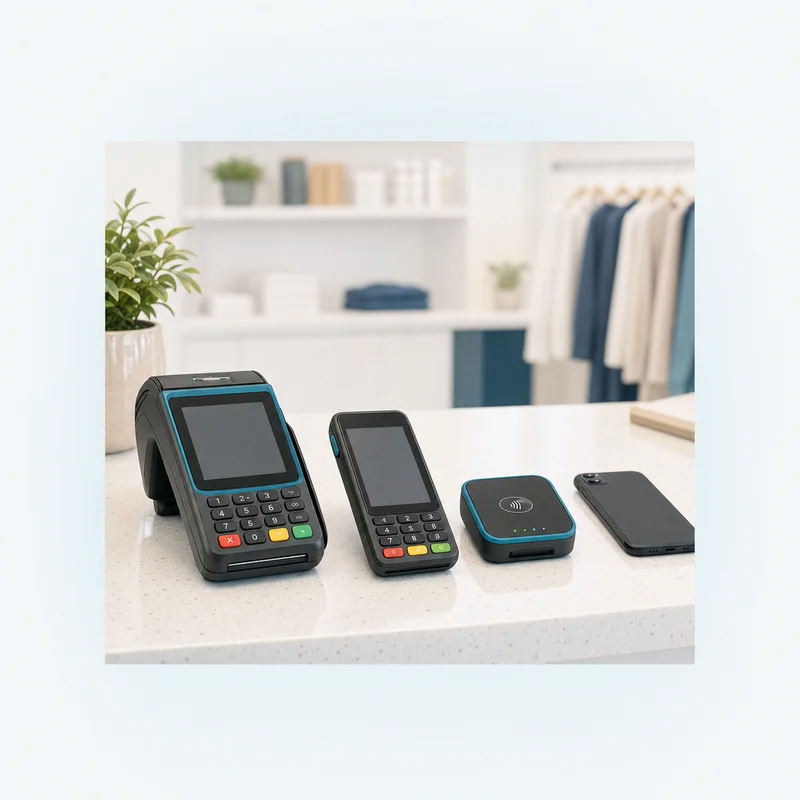
To choose a credit card machine for small business use, start with where you take payments (a counter, a table, a truck, a job site), then pick the device type built for that spot. A terminal or reader you buy or lease should read chip, tap and swipe, be approved under the PCI Security Standards Council’s device standard, and come on terms you fully understand. For tap to pay on a phone, the phone must be on your provider’s supported-device list.
The machine is only one part of what taking cards costs, but it can be the hardest decision to undo, because of a lease that can’t be cancelled or a terminal that works with only one processor. Below are the six common device types, the features each one needs, and how to weigh buying against leasing.
The six types of card machines, matched to where you get paid
Most small businesses choose among six device types. The deciding question is where the customer is standing when they pay, and what else the machine has to do.
| Device type | Where it fits | How it connects | What to watch |
|---|---|---|---|
| Countertop terminal | A fixed checkout counter | Internet cable or Wi-Fi, sometimes a phone line | Often standalone, with amounts keyed in by hand |
| Wireless or cellular terminal | Tableside service, delivery, curbside pickup | Wi-Fi, cellular data, or both | Battery life, signal where you work, any data plan charge |
| Mobile reader with a phone app | Markets, events, field service | Bluetooth to an app on your phone or tablet | Your phone’s battery and signal; confirm it reads chip and tap |
| Android smart terminal | Counter or handheld use, with apps and tipping built in | Wi-Fi, cellular, or both | Which processors the exact model is certified with |
| Full POS station | Restaurants and shops that need menus, inventory and staff logins | Internet, plus printers, cash drawers and handhelds | Software subscriptions, and whether it is locked to one processor |
| Tap to pay on a phone | Occasional or on-the-go sales, or a backup lane | The phone’s built-in contactless (NFC) reader | Contactless only: no chip insert and no swipe |
To see specific models in each category, the POS systems and hardware overview groups them by brand, and the pages on Dejavoo smart terminals, Clover POS systems and Square POS systems go model by model.
A quick way to narrow it down
- One counter and no inventory to track: a countertop or smart terminal.
- Staff bring the payment to the customer: a wireless or handheld smart terminal.
- A new location every week: a mobile reader or tap to pay on a phone.
- Menus, inventory, staff permissions and reporting: a POS system, not just a card machine.
What every terminal or card reader should support
For a terminal or card reader you buy or lease, a few capabilities aren’t optional. Use this checklist when you compare models or read a quote.
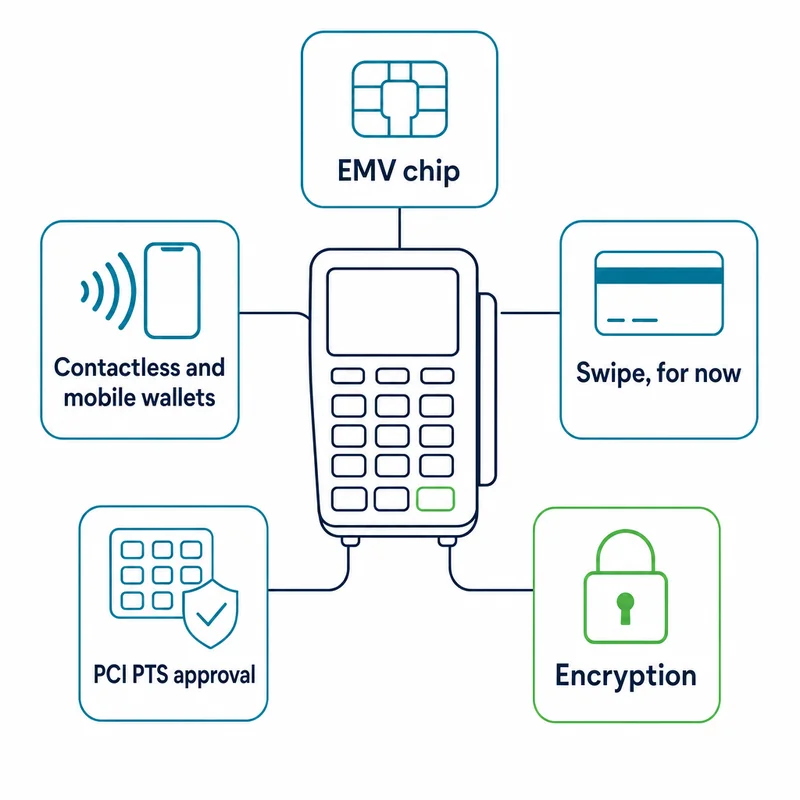
- EMV chip. The chip creates a unique code for each transaction, which the card issuer checks. Under Visa’s liability shift, effective in October 2015, the cost of counterfeit fraud falls on whichever party, merchant or issuer, has not implemented chip technology.
- Contactless and mobile wallets. Tap payments use the same EMV chip standard over a short-range wireless link, and phones and watches act as contactless chip cards. Mastercard said in August 2026 that contactless now makes up nearly 80% of its in-person transactions worldwide.
- Swipe, for now. In the same August 2026 update, Mastercard said U.S. banks won’t be required to issue its chip cards with a magnetic stripe starting in 2027, but U.S. terminals must keep a stripe reader as an option.
- PCI PTS approval. The PCI Security Standards Council’s PIN Transaction Security (PTS) standard covers devices that protect PINs and card data at the point of sale, including readers that pair with a phone or tablet. The Council encourages merchants and their acquirers to choose from its approved device list, so check the exact model.
- Encryption. Card data should be encrypted inside the device, before it travels anywhere.
Tap to pay on a phone is the exception: it takes contactless payments only and falls under a separate PCI standard for phones (MPoC). Its equivalent checks, a phone on your provider’s supported-device list and an app that is a PCI-listed MPoC solution, are covered in the next section.
Two points from the Council’s FAQs matter here. PCI DSS itself doesn’t require PTS-approved devices, but some card brands have their own rules, including on devices with expired approvals, and the Council refers merchants to their acquirer. And an approved device doesn’t by itself make a business PCI compliant or shrink its compliance scope, because on many terminals encryption is optional and can be controlled by the payment software.
That is where point-to-point encryption (P2PE) comes in. A PCI-listed P2PE solution protects card data from the moment the card is read until it reaches a secure decryption point, which the Council says can significantly reduce a merchant’s PCI DSS validation effort. If a machine is described as encrypted, ask whether it’s part of one.
Tap to pay on a phone: when it’s enough, and when it isn’t
Tap to pay turns a phone into the card reader, so there’s no separate device to buy or charge. Apple says Tap to Pay on iPhone needs no extra terminals or hardware and accepts contactless cards, Apple Pay and other digital wallets.
- On iPhone: Apple lists an iPhone Xs or later, the latest version of iOS, and a supported payment app, which is where you turn the feature on. It also notes that some contactless cards may not be accepted by your payment app and that transaction limits may apply.
- On Android: there is no single requirements list. Each payment provider sets its own supported devices and Android versions for Tap to Pay in its app. As examples, Stripe’s documentation currently lists Android 13 or later, a built-in NFC sensor, a phone that isn’t rooted and a security update from the past year, and Square’s help center lists Android 9 or higher with NFC turned on. Check your own provider’s list before counting on a particular phone.
Phone-based acceptance has its own PCI standard, Mobile Payments on COTS (MPoC), which covers contactless and PIN acceptance on off-the-shelf phones and tablets. The Council keeps a list of MPoC solutions, so ask whether your provider’s app is on it.
The trade-off is that a phone reads only contactless payments, so a customer whose card can’t tap needs another way to pay. That makes tap to pay a good fit for low-volume, on-the-go or backup use, and a weaker fit as the only lane at a busy counter. The mobile and wireless payments page compares the phone-based and handheld options.
Processor-locked machines and what happens when you switch
A card machine only works with the processors it has been certified and set up for, and some can’t be moved to another processor at all. Clover’s own FAQ puts it plainly: “While Clover POS devices may be purchased or leased from other entities, they cannot be used with other payment processors.” Other manufacturers publish which processing platforms each model is certified with; Dejavoo’s certification page, for example, lists compatibility by terminal line.
This matters when you buy and again when you leave. A used or discounted machine may be tied to a provider you don’t use, and a locked machine you own outright may need replacing if you change processors.
A locked system isn’t automatically a bad choice; an all-in-one platform can suit a business that wants its software, hardware and processing from one place. Just know which kind you’re buying, and count the cost of leaving. If you’re weighing a change, the guide to switching credit card processors without downtime covers whether to reprogram, re-key or replace each device.
Buying, leasing, or getting a machine through your provider
There are three common ways to get a machine: buy it, lease it, or receive it under a processing agreement. The differences are what you owe, for how long, and what happens if your plans change.
| Question | Buy outright | Lease | Provided with processing |
|---|---|---|---|
| Who owns it | You do, from day one | The leasing company, unless you buy it out | Set by the agreement; ask |
| Cash up front | The full price | Little or none | Little or none |
| Total cost | The purchase price | Every payment for the full term, plus added fees and any buyout | Depends on the agreement; ask how the device is paid for |
| If you switch processors | You keep it, if it can be reprogrammed | Payments may continue; the lease can be a separate contract | Return terms and any early termination fee apply |
| If you close or downsize | You keep the device | Remaining payments may still be owed | Return terms and any early termination fee apply |
Why a lease deserves a close read
In 2018, the Federal Trade Commission warned small businesses about equipment leases sold with a promise that they could cancel any time. It said businesses can end up paying thousands to lease equipment that would have cost a few hundred dollars to buy, that agreements can hold the owner or the signer responsible for the debt, and that some can require disputes to be heard in another state.
The law can also make some leases hard to exit. Under Uniform Commercial Code section 2A-407, in a finance lease that isn’t a consumer lease, the lessee’s promises become “irrevocable and independent” once it accepts the goods, and can’t be cancelled or changed without the other party’s consent. Whether a given terminal lease is a finance lease depends on its terms and your state’s law, which is a question for your attorney.
A worked example: the same machine, bought or leased
For example, say a countertop terminal is offered two ways: $600 to buy, or $49 a month on a 48-month lease. These are made-up round numbers to show the arithmetic, not a quote.
- Buy: in this example you pay $600 once, and the machine is yours.
- Lease: in this example, 48 payments of $49 come to $2,352, before any sales tax, insurance or damage-waiver charges and before any end-of-term buyout.
- Leave after two years: if the lease can’t be cancelled, the remaining 24 payments, $1,176 in this example, may still be owed.
Over its full term, the lease in this example costs nearly four times the purchase price. A lease can still make sense when cash is tight, but compare it on the total of all payments.
Read your lease for these terms
- Whether it can be cancelled early, and what ending it early costs
- The full term, the monthly payment, and the total of all payments
- Taxes, insurance or other charges added to each payment
- Who owns the machine at the end, and the buyout price if there is one
- Whether it renews automatically, and how much notice stops the renewal
- Who signs as personally responsible, and whether the lease can be sold to another company
- Which state’s courts would hear a dispute
- A complete copy of everything you sign, which the FTC advises getting in writing
How to choose a credit card machine for small business, step by step
- Map where payments happen. List every spot (counter, table, curbside, job site, market stall) and which ones need a machine at the same time. Phone and online sales need a virtual terminal or online checkout instead.
- List what else the device must do. Print receipts, prompt for tips, split checks, track inventory or handle staff logins.
- Confirm the must-haves. For a terminal or reader: chip, tap and swipe; PCI PTS approval for the exact model; and encryption, ideally within a PCI-listed P2PE solution. For tap to pay on a phone: a phone on your provider’s supported-device list, and an app that is a PCI-listed MPoC solution.
- Check processor compatibility. Ask which processors the model works with, whether it can be reprogrammed, and what happens to it if you switch.
- Price the whole setup over the time you expect to use it. Add device or lease payments, any software or data plan, and processing fees on your expected card volume.
- Read every agreement before you sign. That includes any lease, which may be a separate contract with a separate company. Keep copies.
- Test before you rely on it. Run a live sale and a refund, and confirm the deposit lands as expected before your busiest day.
Questions to ask your provider before you sign
PayPoint Systems is an independent merchant services provider based in Northwest Indiana, not the card processor, and these are the questions we would want any business to ask any provider before signing, us included.
- Is this exact terminal or reader on the PCI approved device list, and is its approval current?
- Is card data encrypted in the device, and is it part of a PCI-listed P2PE solution?
- For tap to pay on a phone, is my phone on your supported-device list, and is your app a PCI-listed MPoC solution?
- Which processors does this model work with, and can it be reprogrammed if I leave?
- Am I buying, leasing or borrowing it, and who owns it at the end?
- If it is leased, what is the total of all payments, and can the lease be cancelled early?
- Are there monthly software, data plan or support fees on top of processing?
- If it fails, how is it replaced, how quickly, and who pays?
Frequently Asked Questions
How much does a credit card terminal cost?
There is no single price, because the cost comes in three parts: the device itself (bought, leased or supplied by your provider), the processing fees on every sale, and any monthly software, data plan or support charges. Compare options on total cost over the time you expect to use the machine. For a lease, that means multiplying the monthly payment by the number of payments, then adding fees and any buyout. Tap to pay on a phone you already own avoids buying a separate device.
How do I get a card terminal for my business?
You first need a merchant account or payment provider to process the payments, because a terminal only works with processors it has been certified and set up for. Your provider may supply a compatible machine or confirm that one you plan to buy will work. Before you commit, check that the exact model is on the PCI Security Standards Council’s approved device list, reads chip, tap and swipe, and comes on terms you have read in full.
How do I get Tap to Pay for my business?
Tap to pay runs through a payment provider’s app. On iPhone, Apple lists an iPhone Xs or later, the latest version of iOS and a supported payment app, and you turn the feature on inside that app. On Android, each provider sets its own device rules, which include a phone with a working NFC reader and a minimum Android version, so check the provider’s supported-device list. Either way, a phone only accepts contactless payments, so plan a backup for cards that can’t tap.
How can a small business accept Apple Pay?
A card machine, mobile reader or phone setup that accepts contactless payments can generally take Apple Pay, as long as contactless acceptance is turned on with your payment provider. The customer holds a phone or watch near the reader, just like a contactless card. Apple says that in a store, Apple Pay sends the terminal a device-specific account number and a security code unique to that transaction, rather than the actual card number, so the real card number never reaches your machine.
Is paying with NFC safe?
NFC payments use the same EMV chip technology as inserting a card, just over a short-range wireless link, and the chip generates a unique code for each transaction that the card issuer checks. Phone wallets add another layer: Apple says Apple Pay sends a device account number and a transaction-specific security code instead of the card number. For a business, the practical safeguards are a PCI-approved terminal (or a PCI-listed MPoC solution for tap to pay on a phone), encryption, and your usual fraud checks.
Can you get out of a credit card terminal lease?
It depends on the lease. Some equipment leases can’t be cancelled early, and under the Uniform Commercial Code, in a finance lease that isn’t a consumer lease, the lessee’s promises can become irrevocable once it accepts the equipment, depending on the lease terms and state law. Read the lease for early termination, buyout, automatic renewal and notice terms, and ask an attorney if it matters. The lease may also be a separate contract from your processing agreement, so ending processing doesn’t necessarily end the lease.
Related guides
- How to Switch Credit Card Processors Without Downtime
- The Cheapest Way for a Small Business to Accept Credit Cards
Sources
- Tap to Pay on iPhone, Apple
- Tap to Pay, Stripe documentation
- Accept payments with Tap to Pay on Android, Square Support Center
- PIN Transaction Security (PTS) Point of Interaction (POI) Standard, PCI Security Standards Council
- FAQ 1301: How should payment terminals be considered during a PCI DSS assessment?, PCI Security Standards Council
- FAQ 1302: How does use of an expired PTS device affect my PCI DSS compliance?, PCI Security Standards Council
- Securing Account Data with the PCI Point-to-Point Encryption Standard v3, PCI Security Standards Council
- Mobile Payments on COTS (MPoC), PCI Security Standards Council
- Visa to Help Accelerate EMV Chip Migration and Support Merchants (June 16, 2016), Visa
- Swiping left on magnetic stripes (updated August 26, 2026), Mastercard
- What is EMV Chip?, EMVCo
- Apple Pay security and privacy overview, Apple Support
- Clover POS FAQs, Clover
- Certifications, Dejavoo
- Credit card processing “deals” may be scams (June 21, 2018), Federal Trade Commission
- UCC 2A-407: Irrevocable Promises: Finance Leases, Legal Information Institute, Cornell Law School
This article is general information for business owners, not legal, tax, or accounting advice. Card brand rules, interchange schedules, and processor agreements change; confirm specifics against your own statement and your own signed agreement.